Coca-Cola FEMSA — KOF
Designing internal enterprise experiences that bring clarity to complex operational workflows.
I designed UX solutions for Coca-Cola FEMSA's internal enterprise platforms: I dug into the business logic, structured flows, built prototypes, and validated with functional users, using AI to explore visual solutions faster within KOF's Design System.
Company
Coca-Cola FEMSA — KOF
Industry
Enterprise / Operations / Consumer goods
Role
Product Designer / UX Designer
Product type
Internal enterprise platforms / Operational tools
Timeline
Jan 2026 – Jun 2026
Team
UX, Business Analysts, Tech Leads, Developers, Functional Users, Client Stakeholders
Methods
Discovery, Benchmarking, IA, User Flows, Wireframes, Prototyping, Validation, Design System, Handoff
Tools
Figma, FigJam, Gemini, Figma Make, Jira / Confluence
Status
Delivered design initiatives / Under NDA
Confidentiality
Part of this project is under NDA: sensitive screens, operational logic, and client documentation are blurred or simplified. I'm happy to share more detail in an interview or portfolio review.
Context
Coca-Cola FEMSA needed UX support for the internal platforms it uses to manage operational and business workflows: business rules, technical constraints, and Design System standards had to be translated into clear experiences.
I worked on different initiatives such as Cockpit AdminPanel, MRK cell, Geofencing / Geocerca, Sales Leader Profile, and Command Center Image Bank. Each one had its own logic and stakeholders, but all required the same foundation: clarity, validation, and development-ready decisions.
Why it mattered
Designing the screens was the easy 20%. The real work was understanding how internal users get things done and how business processes behave underneath the interface, then turning that into flows people could follow, validate, and build.
My role
I worked as Product Designer, covering everything from UX definition and information architecture to prototypes, validation, and handoff.
- Translated business requirements into user flows, wireframes, prototypes, and documentation.
- Collaborated with Business Analysts, Tech Leads, developers, stakeholders, and functional users.
- Designed high-fidelity interfaces aligned with KOF's Design System.
- Ran validation sessions with functional users and technical teams before handoff.
- Used Gemini and Figma Make to explore visual alternatives faster.
The challenge
The main challenge was designing for platforms where the complexity lives behind the interface: business rules, permissions, technical constraints, and multiple stakeholder expectations.
- User challenge: functional users needed to complete operational tasks with clarity and less cognitive load.
- Business challenge: KOF needed platforms that could sustain complex workflows with consistency and development readiness.
- Design challenge: we had to understand complex logic fast, validate assumptions, and design within a Design System without losing flexibility.
Problem statement
How might we help functional users complete complex operational workflows through clearer internal tools, while respecting the business logic and the Design System?
Goals & success criteria
User goals
- Complete operational workflows more clearly.
- Reduce confusion caused by complex business logic or fragmented information.
Business goals
- Reduce ambiguity before development.
- Maintain consistency across KOF's internal ecosystem.
Design goals
- Create clear user flows, wireframes, prototypes, and documentation.
- Validate proposed solutions with functional users and technical teams.
- Use AI to explore alternatives faster without replacing UX judgment.
Process
01 — Discover
Understanding the business logic before designing the interface
I started each initiative with the business context, the operational workflow, and the constraints behind the request. In enterprise UX, the interface is only the visible layer.
- Reviewed business requirements, user stories, and available documentation.
- Clarified the purpose of each initiative with Business Analysts and stakeholders.
- Identified user roles, dependencies, and technical constraints.
- Identified assumptions that needed validation before detailed design.
How I used AI
I used Gemini to organize each case's context and build more precise prompts for Figma Make. The final decisions were mine, based on UX criteria, stakeholder feedback, and KOF's Design System.
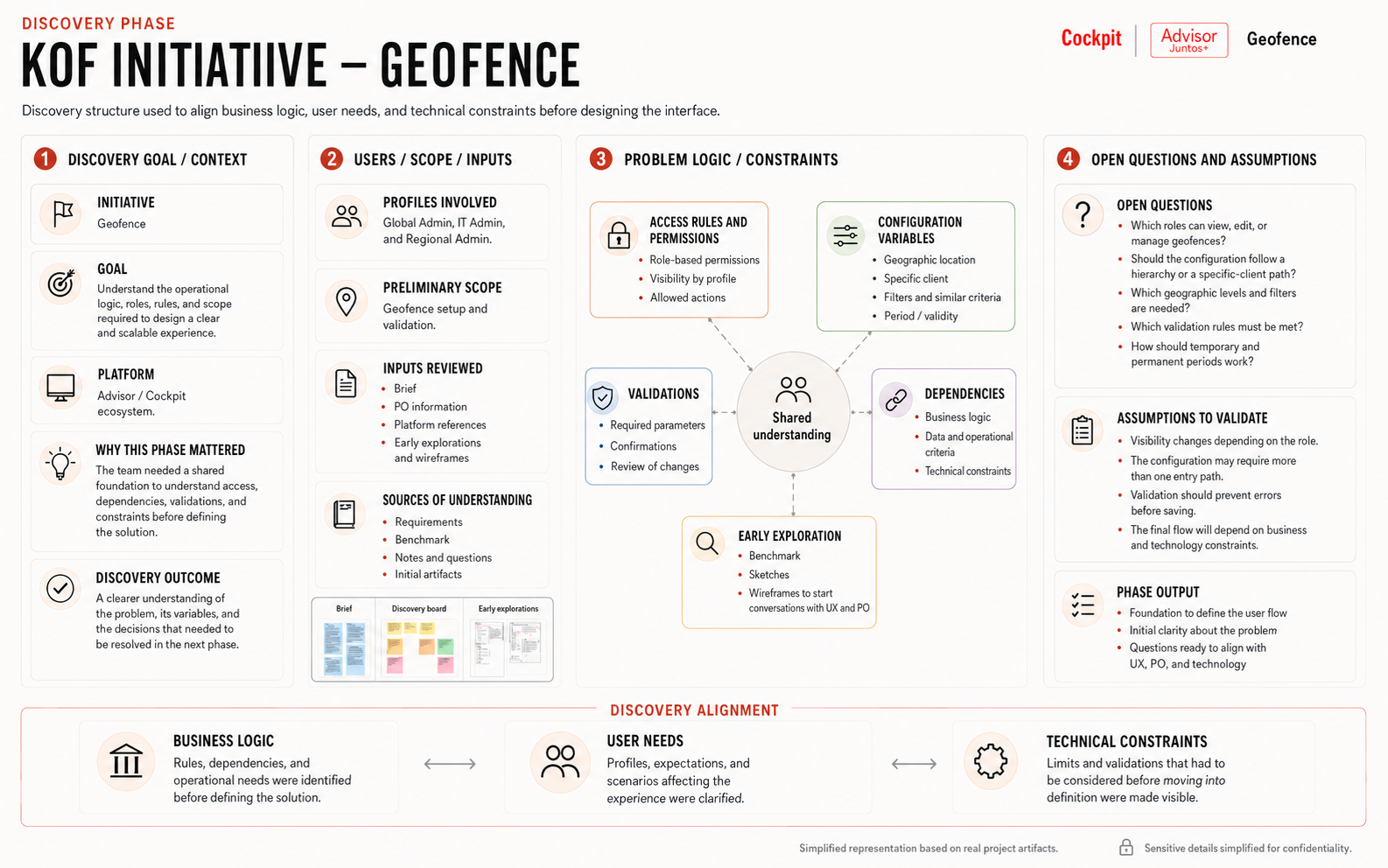
Discovery structure used to align business logic, user needs, and technical constraints before designing the interface.
02 — Define
Turning complex requirements into clear UX direction
I translated the requirements into a UX direction that aligned BA, technical teams, and stakeholders before detailed design, especially when the logic was hard to understand in writing alone.
- Synthesized requirements into user flows and interaction logic.
- Defined information architecture and screen structure for each initiative.
- Identified which parts of the flow required validation with functional users.
How I used AI
I used Gemini to turn project context into structured prompts for Figma Make, and treated the outputs as exploration only.
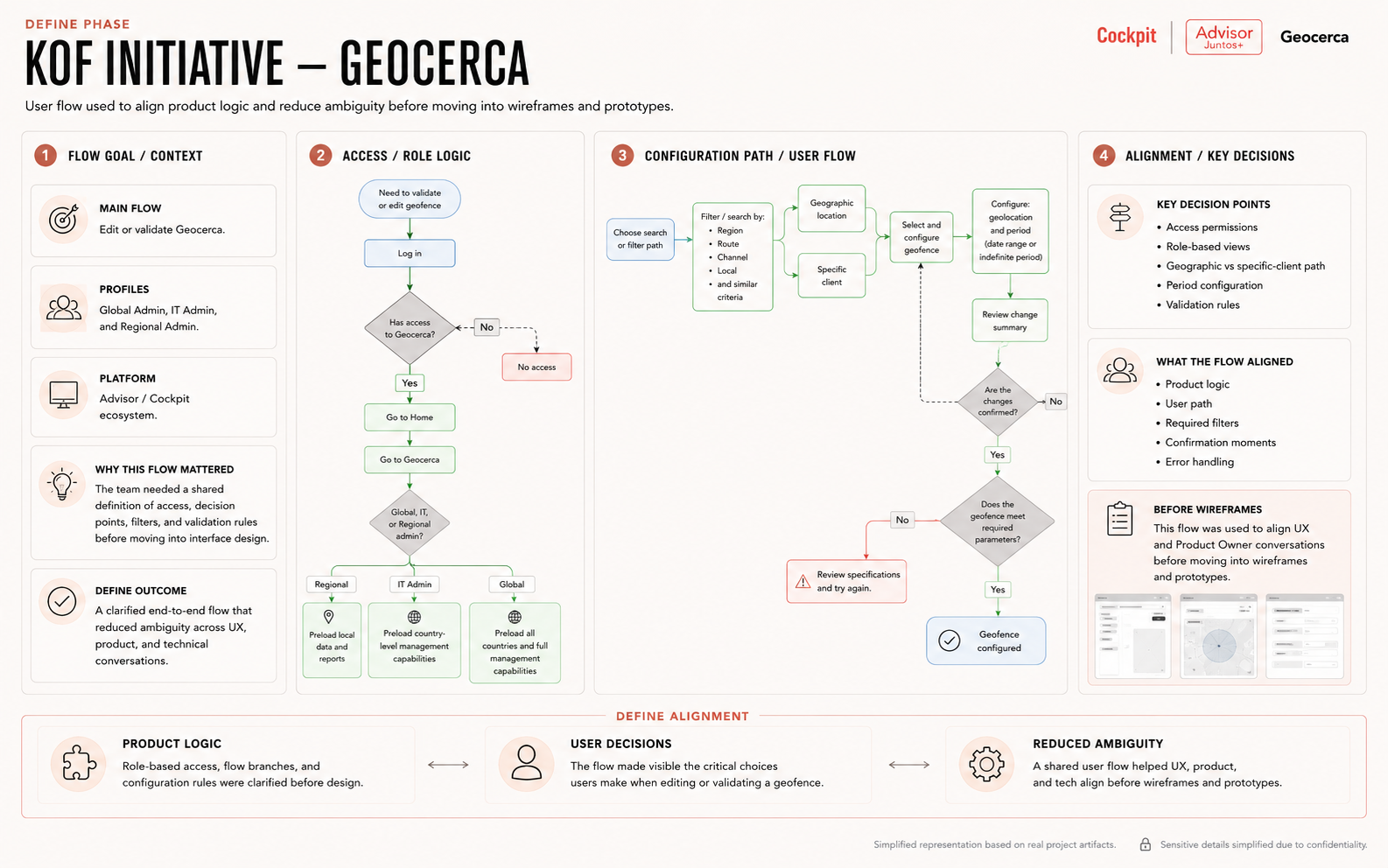
User flow used to align product logic and reduce ambiguity before moving into wireframes and prototypes.
03 — Develop
Exploring solutions with Design System consistency
With the direction clear, I explored interface structures, flows, and prototypes that were understandable for users, realistic for development, and consistent with the KOF ecosystem.
- Created wireframes and prototypes, exploring how to structure information, actions, filters, and states.
- Used KOF's Design System components to maintain visual and functional consistency.
- Built new structures when needed, from the system's atomic foundations.
- Iterated on feedback from BA, technical teams, and functional users.
How I used AI
I used Figma Make as an ideation accelerator; the explorations helped me see possible structures, and I rebuilt the final solutions with KOF's components.
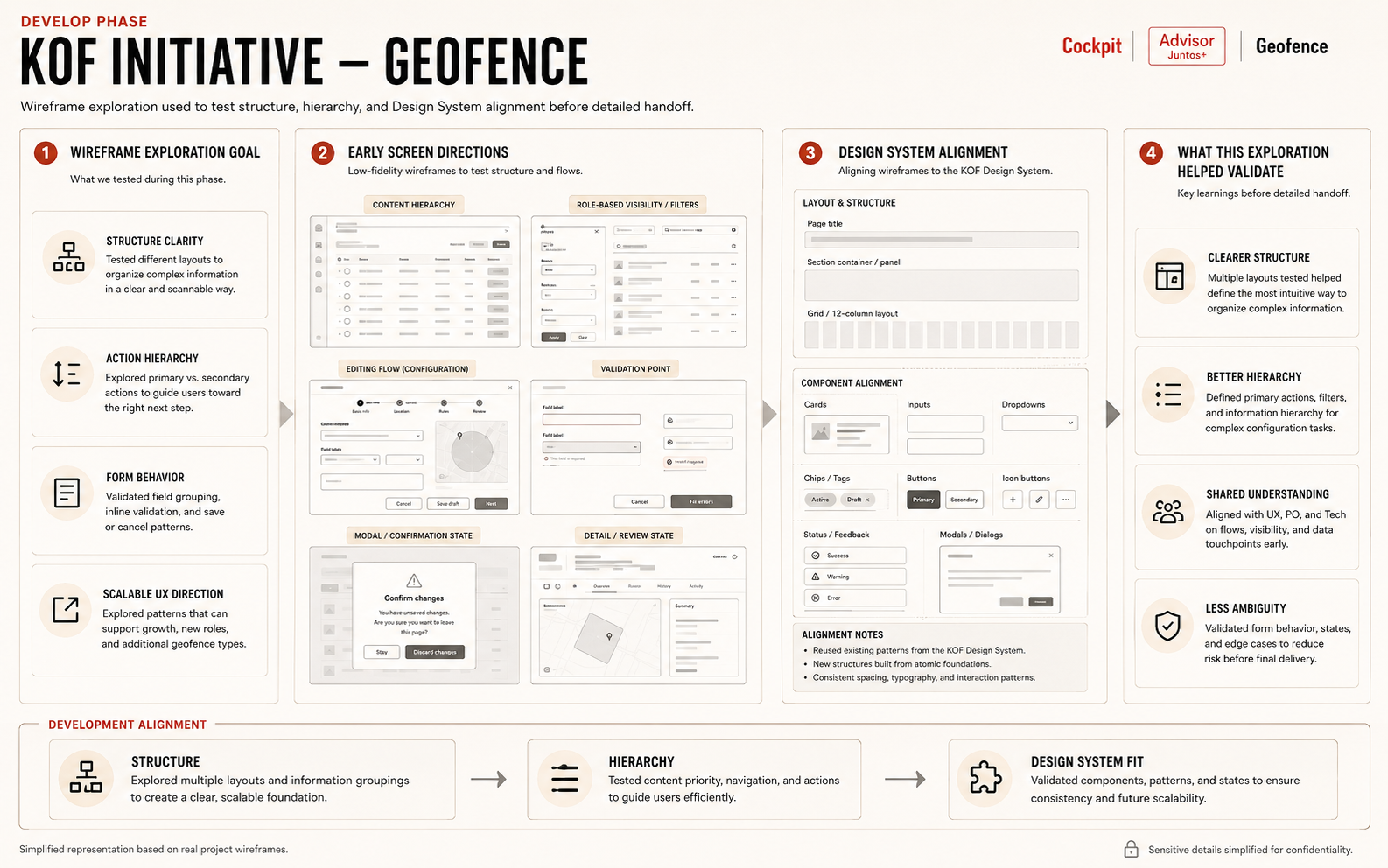
Wireframe exploration used to test structure, hierarchy, and Design System alignment before detailed handoff.
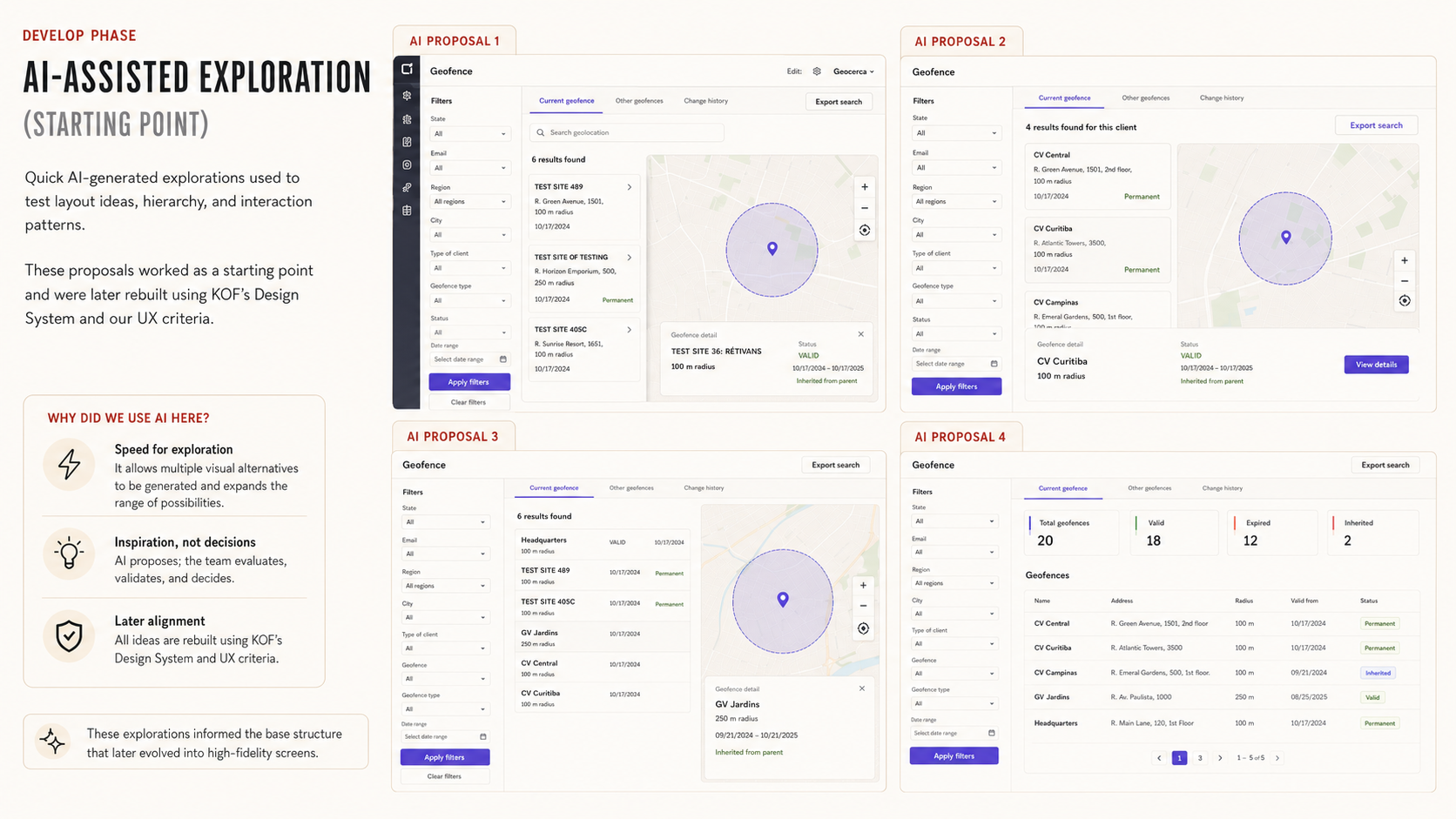
AI-assisted exploration used as a starting point, later rebuilt with KOF's Design System and UX decision criteria.
04 — Deliver
Validating and handing off development-ready UX solutions
I documented flows, prototypes, rationale, and interaction decisions so the team could reach implementation with fewer doubts.
- Delivered user flows, wireframes, prototypes, and UX documentation.
- Validated proposed solutions with functional users and technical teams.
- Prepared handoff material for developers and product teams.
How I used AI
I used AI for speed in exploration and documentation; the final handoff rested on flows validated with users and technical teams.
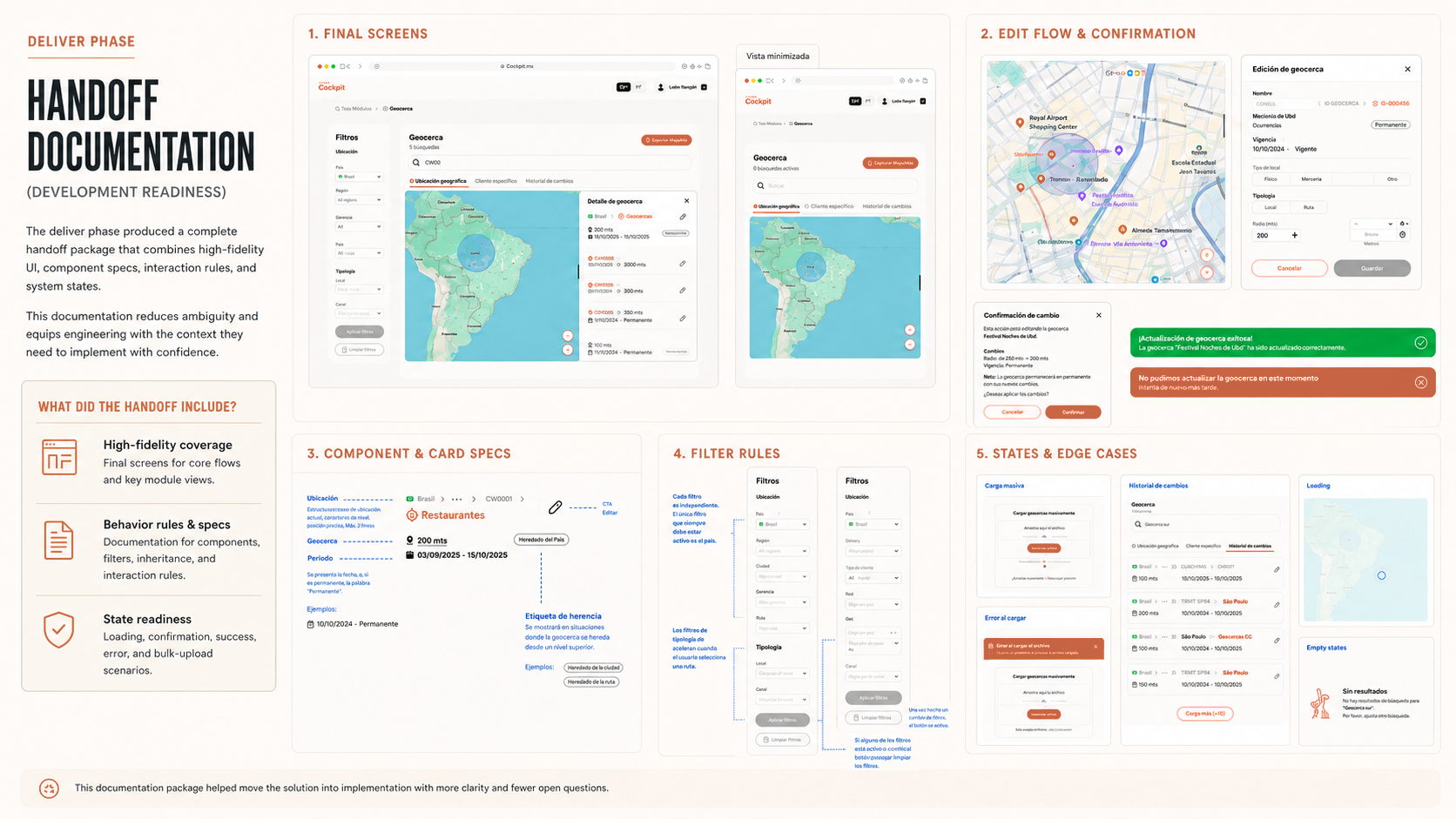
Handoff documentation created to reduce ambiguity and support development readiness.
Before / after
Before
Operational logic was hard to understand through documentation alone, which created ambiguity between UX, BA, technical teams, and functional users.
After
Clear flows, prototypes, and Design System-aligned solutions that improved shared understanding before development.
Final solution
The work focused on three improvements:
Clearer operational flows
I translated complex business logic into user flows and prototypes that showed how each experience should behave.
Design System-aligned solutions
I used KOF's Design System to keep things consistent, extending structures only when the product logic required it.
AI-assisted ideation with UX control
I accelerated early visualization with Gemini and Figma Make, then rebuilt the final solutions with UX judgment and the system's components.
Impact & results
User value
Clearer internal experiences designed around real operational workflows.
Business value
Complex business logic translated into actionable UX solutions.
Team / process value
Less ambiguity between UX, BA, technical teams, and stakeholders before development.
Product / system value
Consistent internal tools thanks to KOF's Design System.
Obstacles & trade-offs
In enterprise UX, the challenge was making the workflow understandable without losing operational accuracy, balancing business complexity, technical feasibility, and the Design System.
- Understanding complex business logic quickly.
- Working with scope and priorities in motion.
- Balancing Design System consistency with feature-specific needs.
- Designing for internal workflows where users, rules, and permissions can vary.
What I learned
This project confirmed something I already suspected about enterprise UX: the real skill is understanding the business logic deeply enough to make it usable and buildable.
- I learned to move faster through complex enterprise contexts without skipping UX rigor.
- I improved how I validate solutions with functional users and technical teams.
- AI works as an exploration partner when UX judgment stays at the center.
- Design Systems are most valuable when they support consistency without blocking product logic.
What leaders said about my work
Stephanie demonstrated a high level of commitment, professionalism, and responsibility, contributing across research, information architecture, experience definition, user flows, benchmarking, prototyping, and validation.
Diana Castillo Vargas
She maintained effective communication with stakeholders and collaborated actively with multidisciplinary teams, bringing a user-centered perspective to improve the product experience.
Diana Castillo Vargas
KOF is probably the clearest example of how I work in an enterprise environment I'm still learning: get under the interface to understand the business logic, use AI where it actually helps speed up exploration, and turn what starts as ambiguity into decisions the team can validate and build on.
Stephanie Cacheo — Senior Product Designer / UX Lead