LA Clippers / Intuit Dome
Designing digital experiences for a live stadium ecosystem where fans, staff, events, and operations had to work together in real time.
I contributed to the digital experience of Intuit Dome, the LA Clippers' stadium ecosystem, across fan-facing and operational touchpoints: user flows, research support, the calendar experience, notification strategy, and a User Communication System proposal.
Company
LA Clippers / Intuit Dome
Industry
Entertainment / Sports / Venue tech
Role
UX Designer
Product type
Stadium digital ecosystem / Fan App / Staff App
Timeline
May 2024 – Dec 2024 · Jun 2025 – Oct 2025
Team
UX, Visual Design, BA, PO, Client Stakeholders, Research, Development
Methods
Discovery, User Flows, Benchmarking, Intercepts, IDIs, Notification Strategy, Prototyping, Documentation
Tools
Figma, FigJam, Claude, Jira, Confluence, Miro
Status
Launched ecosystem / Post-launch optimization / Some proposals evolved after handoff
Confidentiality
Part of this project is under NDA: sensitive screens, business logic, and operational details are blurred or simplified. I'm happy to share more detail in an interview or portfolio review.
Context
Intuit Dome is a stadium ecosystem where digital experiences accompany fans and staff before, during, and after every live event: event discovery, notifications, operational tools, and post-launch improvements.
I joined at the height of launch pressure and came back later for post-launch optimization, with scope that kept changing.
Why it mattered
In a stadium, digital decisions affect how fans discover events, move through the venue, and use services while everything is happening live. The UX had to connect product logic, operational constraints, and real fan behavior without slowing delivery down.
My role
I worked as UX Designer, between hands-on execution and strategic product thinking.
- Designed user flows, high-fidelity screens, benchmarks, presentations, and UX documentation.
- Contributed to Fan App and Staff App improvements at launch and post-launch, minding ADA accessibility standards.
- Proposed a unified calendar view for games and events.
- Developed a User Communication System proposal with notification types, priorities, and channels.
- Supported remote and onsite research with observation, intercepts, and IDIs.
The challenge
The challenge was designing digital experiences for a live stadium, where product decisions had to serve fans, staff, and operations under constantly changing conditions.
- User challenge: fans needed to discover games and events and receive timely information without feeling overwhelmed.
- Business challenge: the product had to hold up through the stadium launch and later optimization with evolving priorities.
- Design challenge: the work happened in a fast-moving environment, with shifting scope and many touchpoints that needed consistency.
Problem statement
How might we help fans and staff navigate a complex stadium experience with clearer flows and communication patterns, from launch through post-launch optimization?
Goals & success criteria
User goals
- Help fans understand games, events, and venue information.
- Improve discovery across event and calendar experiences.
- Reduce confusion around notifications and in-app messages.
Business goals
- Sustain the digital ecosystem through launch and the roadmap after it.
- Translate real fan and staff behavior into product opportunities.
Design goals
- Create clear user flows and product proposals.
- Improve event discovery with a unified calendar.
- Define a structured communication and notification strategy.
Process
01 — Discover
Understanding the stadium ecosystem before designing the experience
I started by building context: the project required understanding not just the app, but how the digital experience connected to the physical venue, fans, staff, and real-time operations.
- Reviewed user stories, requirements, and existing documentation.
- Analyzed the relationship between the Fan App, the Staff App, events, and operations.
- Supported onsite research at Intuit Dome with intercepts and IDIs to capture real fan and staff frictions.
- Used benchmarks of calendars, notifications, and stadium experiences.
How I used AI
I used Claude to accelerate my understanding of user stories, organize context, and generate early visual exploration ideas. The final decisions were mine, based on UX criteria, stakeholder feedback, and research observations.
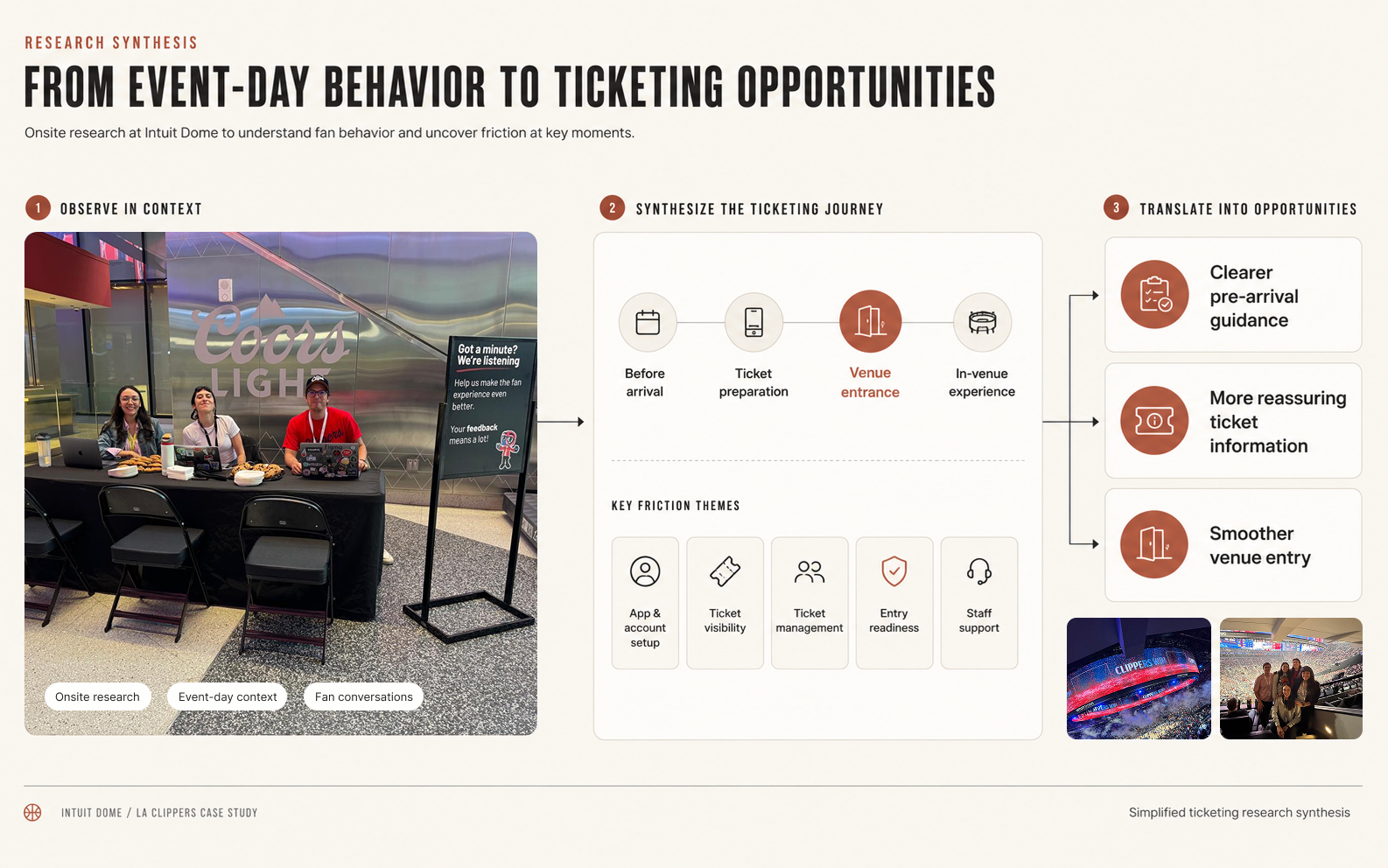
Research synthesis used to connect real behavior inside the venue with digital product opportunities.
02 — Define
Turning research into clearer UX opportunities
Then I helped translate scattered inputs into UX opportunities: where navigation needed to improve, where communications needed structure, and where product logic needed simplifying.
- Synthesized research observations and user stories into actionable opportunities.
- Defined UX direction for the unified calendar proposal.
- Structured the logic of notification types, priorities, and delivery channels.
How I used AI
I used AI to summarize complex user stories and isolate the design-relevant information.
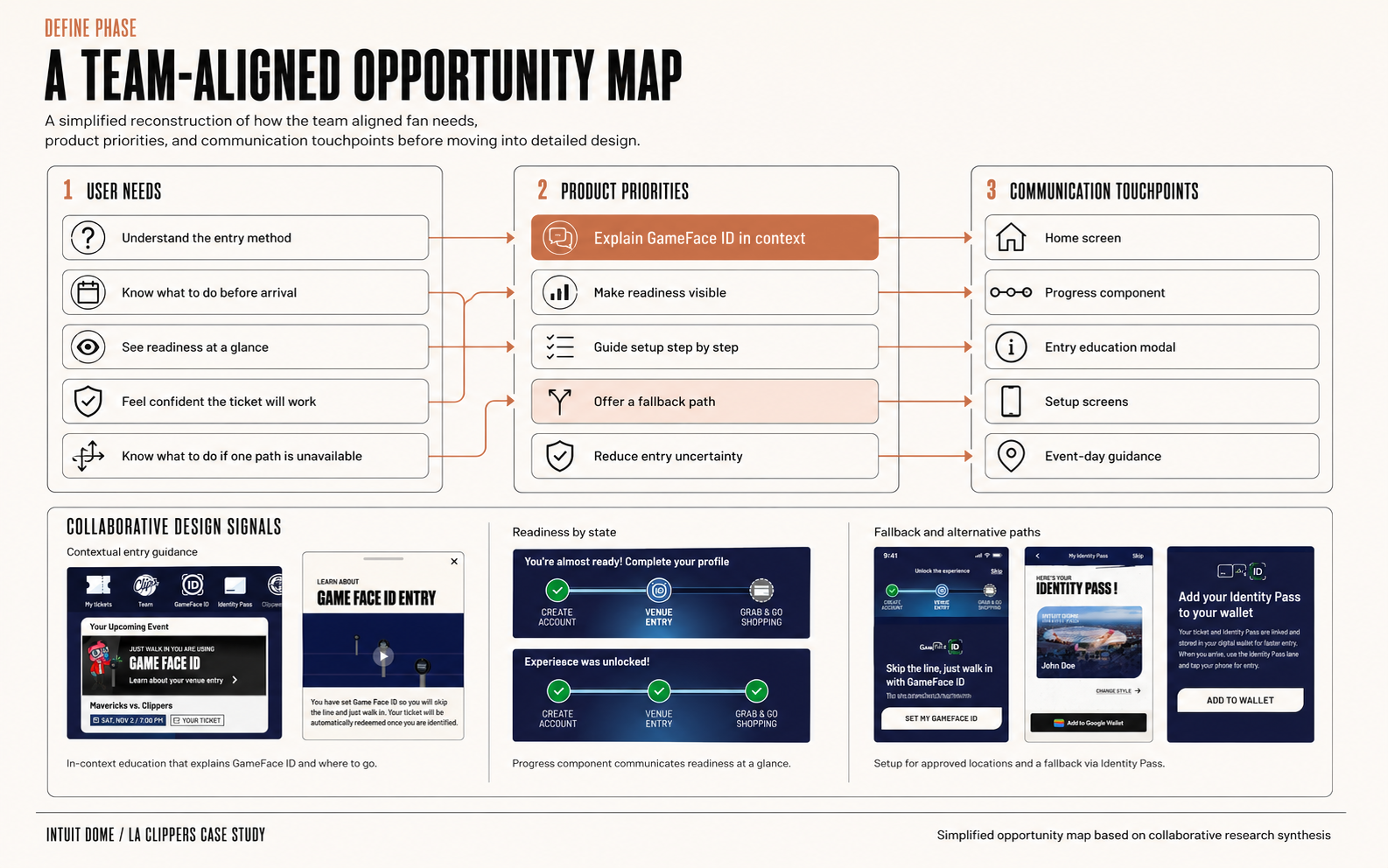
Opportunity map used to align user needs, product priorities, and communication touchpoints before designing solutions.
03 — Develop
Exploring flows, calendar improvements, and communication patterns
With the direction clear, I moved into hands-on exploration: flows, screens, and proposals that helped the team evaluate improvements.
- Designed a unified calendar proposal to bring games and events into one clearer experience.
- Developed the User Communication System proposal with notification categories, priority matrices, and guidelines.
- Refined email, notification, and in-app message copy.
- Iterated on feedback from design leads, product, and client stakeholders.
How I used AI
I used AI to refine communication copy and generate visual ideas from the project context and constraints; the outputs were only a starting point.
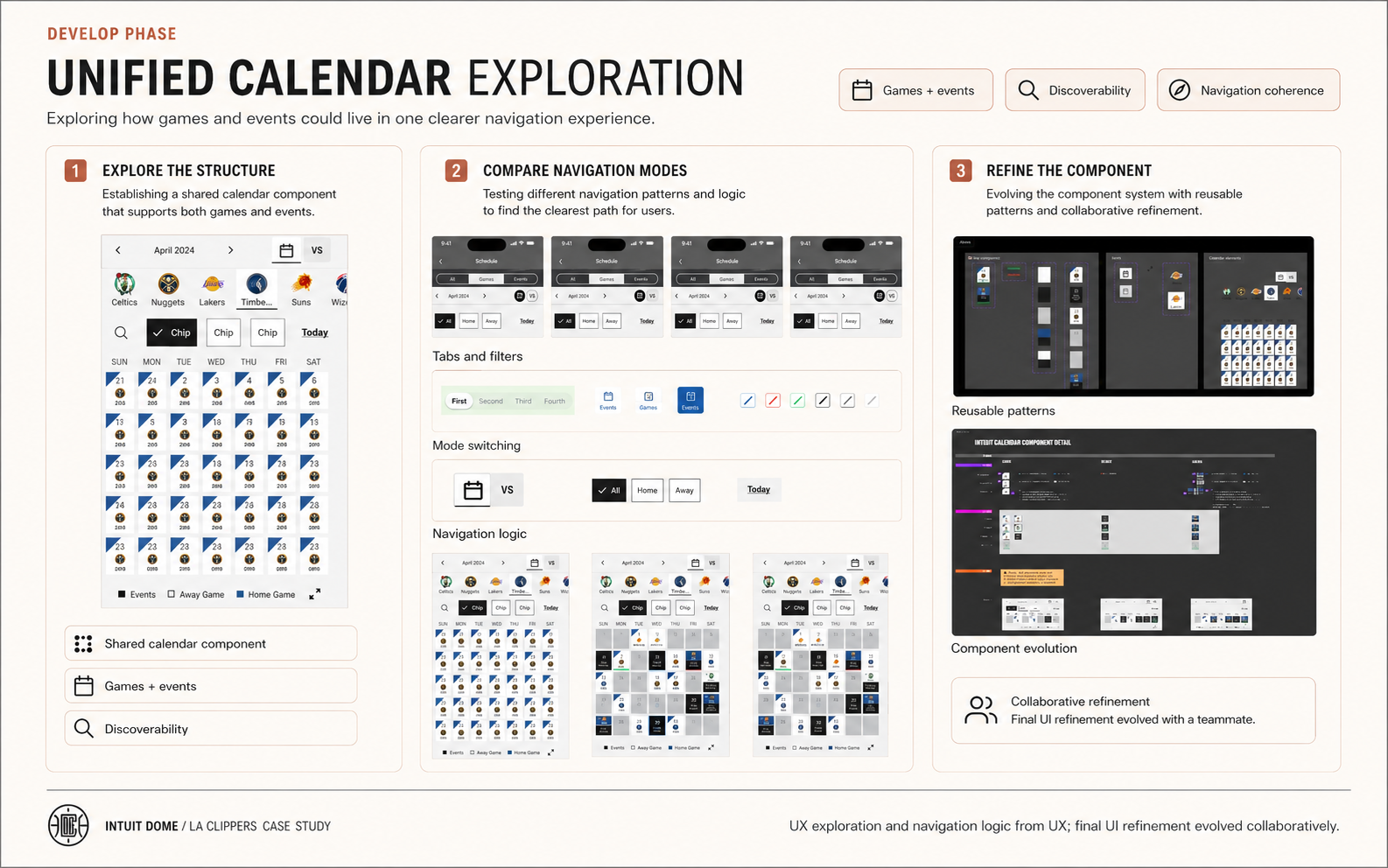
Calendar exploration used to improve event discoverability and create a more coherent navigation experience.
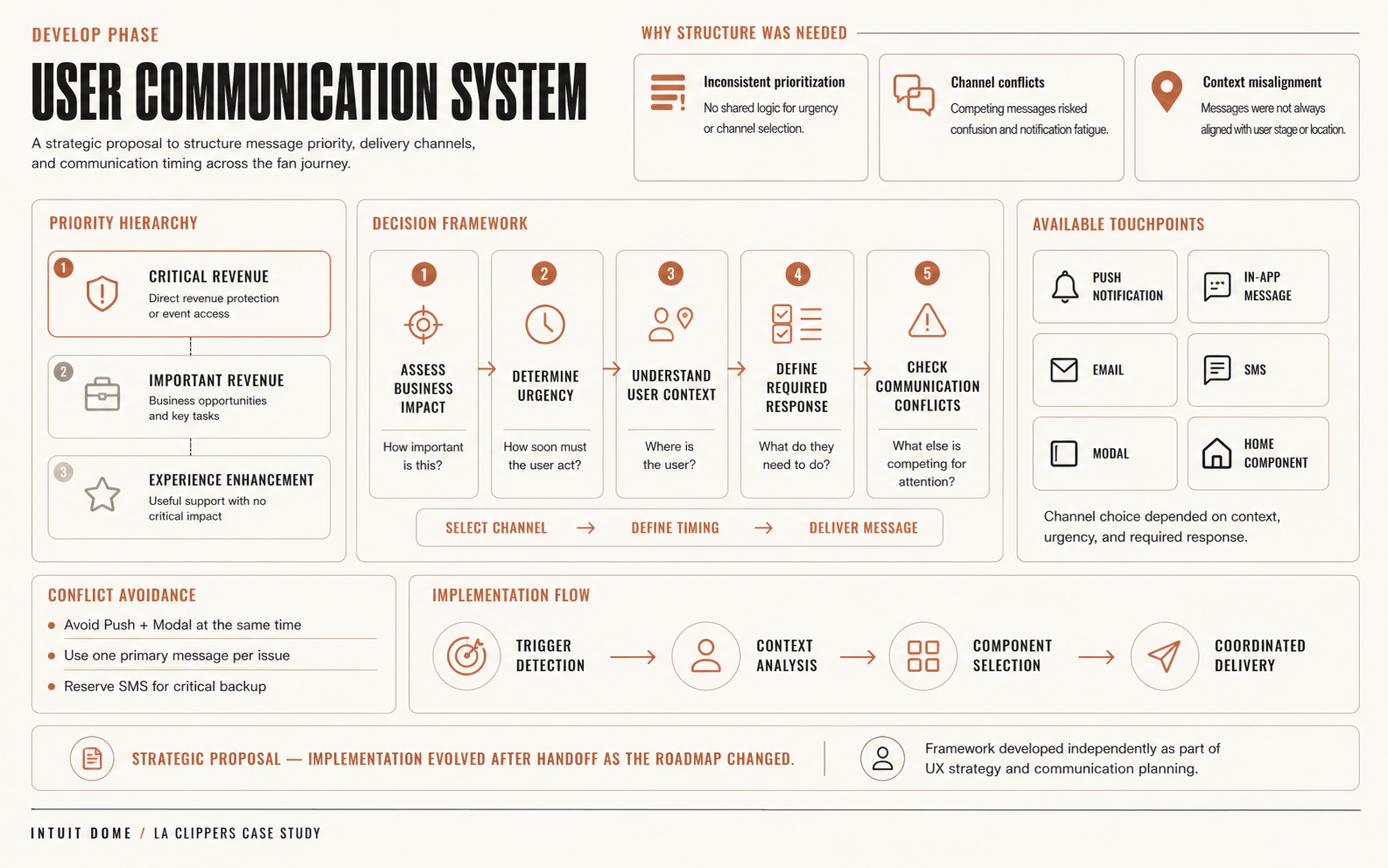
Communication system proposal created to bring more structure and prioritization to in-app messages and notifications. It was delivered as a strategic proposal; the implementation evolved after handoff as the roadmap changed.
04 — Deliver
Supporting launch and post-launch optimization
The final work supported launch delivery and later optimization. Some proposals were delivered as strategic foundations and evolved when the roadmap changed.
- Delivered user flows, screens, benchmarks, product proposals, and UX documentation.
- Contributed to the unified calendar proposal and the User Communication System as strategic foundations.
- Helped translate real user and operational frictions into product improvement opportunities.
How I used AI
I used AI for documentation, copy refinement, and fast synthesis of design-relevant information.
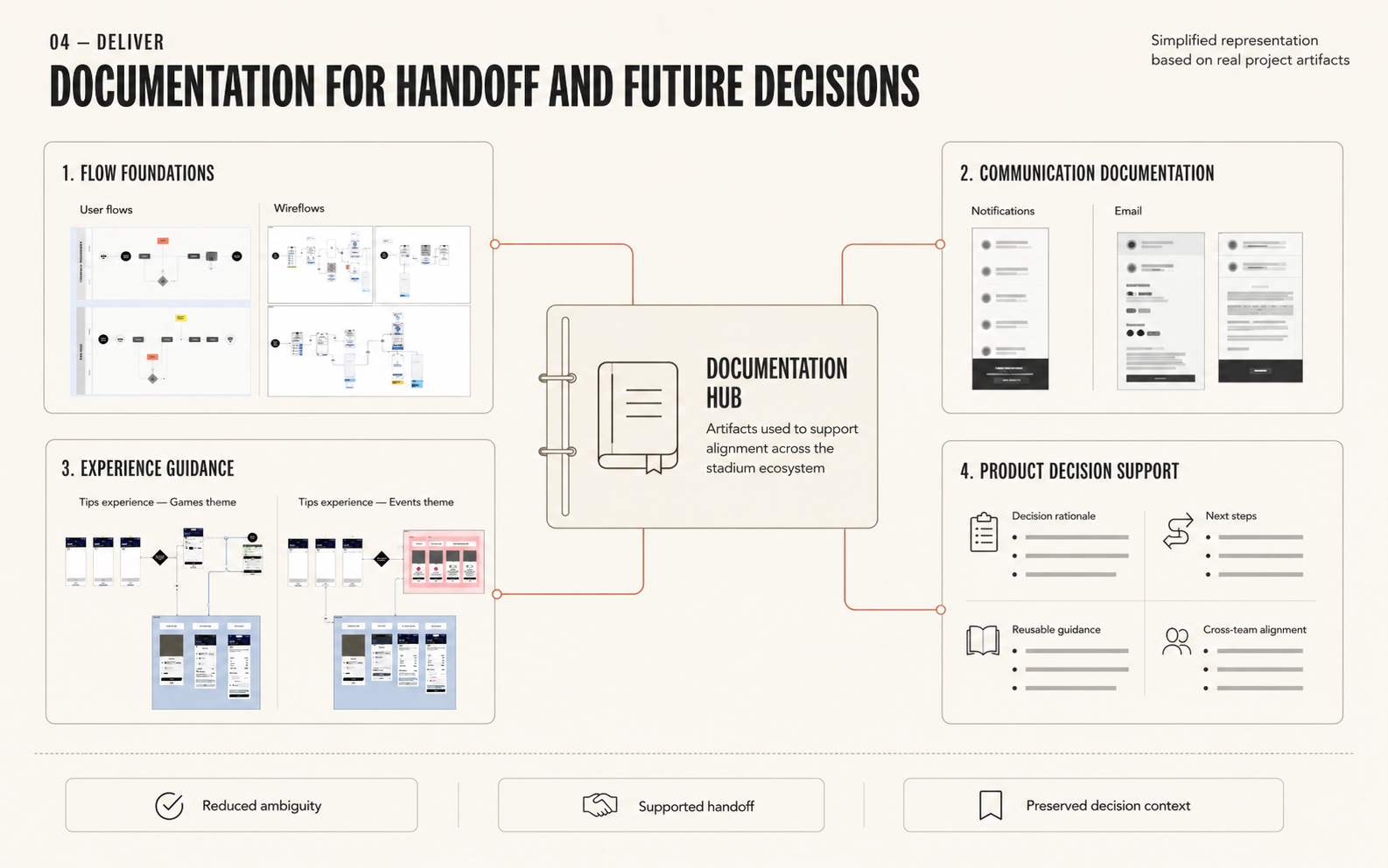
UX documentation created to reduce ambiguity and support future product decisions across the stadium ecosystem.
Before / after
Before
Multiple touchpoints, changing requirements, and communications that fragmented between the fan experience and the operational one.
After
Clearer UX proposals for event discovery, notification prioritization, and post-launch optimization, based on real fan and staff behavior.
Final solution
The proposal focused on three improvements:
Clearer event discovery
A unified calendar brought games and events together so users could see what was happening at Intuit Dome from one place.
More structured communication
The User Communication System defined notification types, priorities, and channels for more consistent communication decisions.
Research-informed optimization
Remote and onsite research translated real fan and staff behavior into opportunities for the Fan App and the Staff App.
Impact & results
User value
Helped identify and address frictions that affected fans and staff in real venue contexts.
Business value
Supported launch and post-launch product decisions in a high-pressure environment.
Product value
Clearer structures for event discovery, notifications, and communication.
Team / process value
Research-informed documentation and proposals that made cross-functional alignment easier.
Obstacles & trade-offs
The stadium environment made the work especially complex: digital flows were connected to real-time physical experiences, with priorities and scope in motion.
- Navigating frequent changes in scope, requirements, and priorities.
- Balancing fan needs with the staff's operational requirements.
- Designing under launch pressure while maintaining quality.
- Working in English and collaborating in a multicultural project environment.
What I learned
In a live ecosystem, product design is about understanding how digital decisions play out in the real world, especially when the experience is tied to a physical space.
- I learned to connect digital flows with real-world user behavior.
- I improved how I translate user stories into design-relevant decisions.
- Communication systems reduce friction when they have clear priorities.
- Research is most powerful when it helps teams see what happens beyond the interface.
What leaders said about my work
Stephanie consistently delivered high-quality work across user flows, presentations, benchmarks, and screens, showing excellent time management and adaptability in a complex project environment.
Hemant Patil, PM & Camila Maria Ferraro Murdoch, Design Lead
Your ability to take the lead and tackle challenges head-on, even when you may not have all the necessary tools and knowledge, is truly commendable.
Isadora Valline, Design Director
Her contribution to the Intuit Dome research was crucial. Her experience and perspective were fundamental to the project.
Carolina Vassallucci Duarte, PM & Lucia Hidalgo, Design Lead
Intuit Dome pushed me to work at the edge of digital and physical experience at the same time, across teams that didn't always agree on priorities. What I took from it is a sharper instinct for turning requirements that keep shifting into UX proposals solid enough to actually support both users and the people making product decisions.
Stephanie Cacheo — Senior Product Designer / UX Lead