Coca-Cola FEMSA — KOF
Diseño de experiencias empresariales internas que dan claridad a flujos de trabajo operativos complejos.
Diseñé soluciones de UX para plataformas empresariales internas de Coca-Cola FEMSA: entendí la lógica de negocio, estructuré flujos, creé prototipos y validé con usuarios funcionales, usando IA para explorar soluciones visuales más rápido dentro del Design System de KOF.
Empresa
Coca-Cola FEMSA — KOF
Industria
Empresarial / Operaciones / Bienes de consumo
Rol
Product Designer / UX Designer
Tipo de producto
Plataformas empresariales internas / Herramientas operativas
Duración
Ene 2026 – Jun 2026
Equipo
UX, Business Analysts, Tech Leads, Developers, Usuarios funcionales, Stakeholders del cliente
Métodos
Discovery, Benchmarking, Arquitectura de información, User Flows, Wireframes, Prototyping, Validación, Design System, Handoff
Herramientas
Figma, FigJam, Gemini, Figma Make, Jira / Confluence
Estado
Iniciativas de diseño entregadas / Bajo NDA
Confidencialidad
Parte de este proyecto está bajo NDA: las pantallas, la lógica operativa y la documentación sensible del cliente aparecen difuminadas o simplificadas. Puedo compartir más detalle en una entrevista o revisión de portafolio.
Contexto
Coca-Cola FEMSA necesitaba apoyo de UX para las plataformas internas con las que gestiona sus flujos de trabajo operativos y de negocio: había que traducir reglas de negocio, restricciones técnicas y estándares del Design System en experiencias claras.
Trabajé en distintas iniciativas como Cockpit AdminPanel, MRK cell, Geofencing / Geocerca, Sales Leader Profile y Command Center Image Bank. Cada una tenía su propia lógica y stakeholders, pero todas requerían la misma base: claridad, validación y decisiones listas para desarrollo.
Por qué importaba
Diseñar las pantallas era el 20% fácil. El verdadero trabajo era entender cómo los usuarios internos resuelven sus tareas y cómo se comportan los procesos debajo de la interfaz, y convertir eso en flujos que la gente pudiera seguir, validar y construir.
Mi rol
Trabajé como Product Designer, cubriendo desde la definición de UX y la arquitectura de información hasta los prototipos, la validación y el handoff.
- Traduje requerimientos de negocio en user flows, wireframes, prototipos y documentación.
- Colaboré con Business Analysts, Tech Leads, developers, stakeholders y usuarios funcionales.
- Diseñé interfaces de alta fidelidad alineadas con el Design System de KOF.
- Realicé sesiones de validación con usuarios funcionales y equipos técnicos antes del handoff.
- Usé Gemini y Figma Make para explorar alternativas visuales más rápido.
El reto
El principal reto era diseñar para plataformas donde la complejidad vive detrás de la interfaz: reglas de negocio, permisos, restricciones técnicas y expectativas de múltiples stakeholders.
- Reto de usuario: los usuarios funcionales necesitaban completar tareas operativas con claridad y menos carga cognitiva.
- Reto de negocio: KOF necesitaba plataformas capaces de sostener flujos complejos con consistencia y disposición para desarrollo.
- Reto de diseño: había que entender lógica compleja rápido, validar supuestos y diseñar dentro de un Design System sin perder flexibilidad.
Problem statement
¿Cómo podemos ayudar a los usuarios funcionales a completar flujos operativos complejos con herramientas internas más claras, respetando la lógica de negocio y el Design System?
Objetivos y criterios de éxito
Objetivos de usuario
- Completar flujos de trabajo operativos con más claridad.
- Reducir la confusión causada por lógica de negocio compleja o información fragmentada.
Objetivos de negocio
- Reducir la ambigüedad antes del desarrollo.
- Mantener consistencia a lo largo del ecosistema interno de KOF.
Objetivos de diseño
- Crear user flows, wireframes, prototipos y documentación claros.
- Validar las soluciones propuestas con usuarios funcionales y equipos técnicos.
- Usar IA para explorar alternativas más rápido sin reemplazar el criterio de UX.
Proceso
01 — Descubrir
Entender la lógica de negocio antes de diseñar la interfaz
Empecé cada iniciativa por el contexto de negocio, el flujo operativo y las restricciones detrás de la solicitud. En UX empresarial, la interfaz es solo la capa visible.
- Revisé requerimientos de negocio, user stories y documentación disponible.
- Aclaré el propósito de cada iniciativa junto con Business Analysts y stakeholders.
- Identifiqué roles de usuario, dependencias y restricciones técnicas.
- Identifiqué supuestos que necesitaban validación antes del diseño detallado.
Cómo usé la IA
Usé Gemini para organizar el contexto de cada caso y crear prompts más precisos para Figma Make. Las decisiones finales fueron mías, basadas en criterios UX, el feedback de stakeholders y el Design System de KOF.
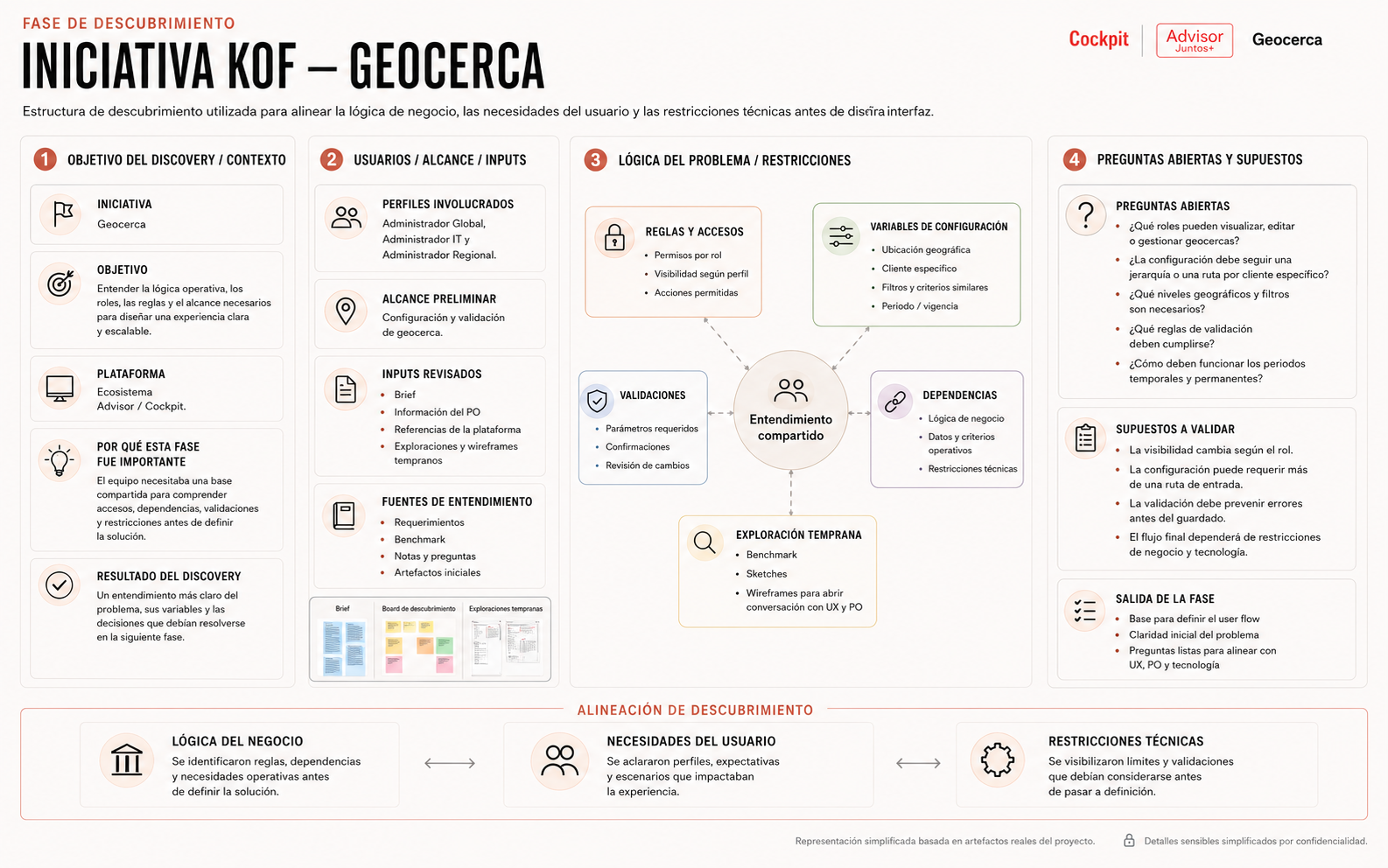
Estructura de discovery usada para alinear la lógica de negocio, las necesidades de usuario y las restricciones técnicas antes de diseñar la interfaz.
02 — Definir
Convertir requerimientos complejos en una dirección de UX clara
Traduje los requerimientos en una dirección de UX que alineara a BA, equipos técnicos y stakeholders antes del diseño detallado, sobre todo cuando la lógica era difícil de entender solo por escrito.
- Sinteticé los requerimientos en user flows y lógica de interacción.
- Definí la arquitectura de información y la estructura de pantallas para cada iniciativa.
- Identifiqué qué partes del flujo requerían validación con usuarios funcionales.
Cómo usé la IA
Usé Gemini para transformar el contexto en prompts estructurados para Figma Make, y tomé los resultados solo como exploración.
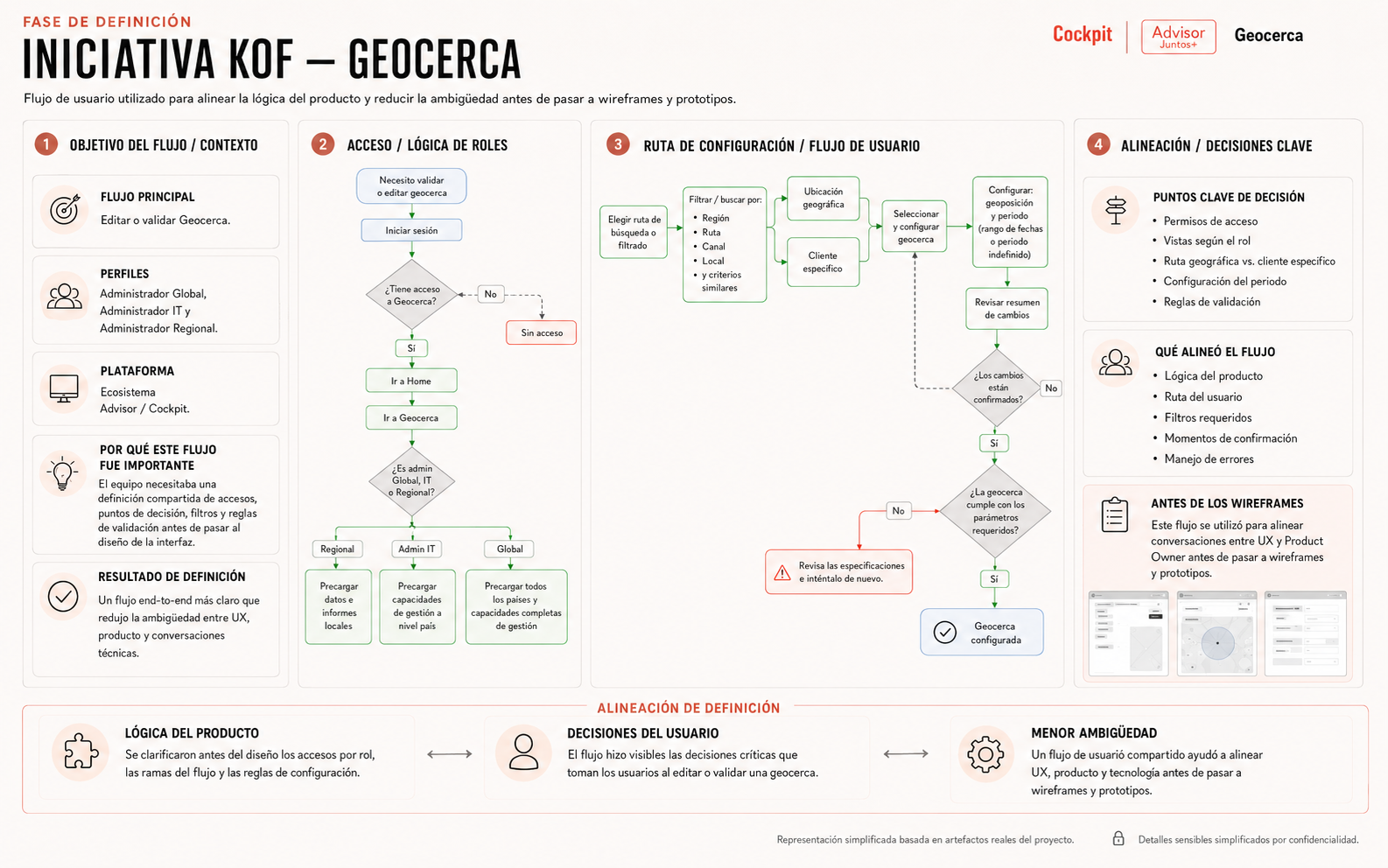
User flow usado para alinear la lógica del producto y reducir la ambigüedad antes de pasar a wireframes y prototipos.
03 — Desarrollar
Explorar soluciones con consistencia de Design System
Con la dirección clara, exploré estructuras de interfaz, flujos y prototipos comprensibles para los usuarios, realistas para desarrollo y consistentes con el ecosistema de KOF.
- Creé wireframes y prototipos, explorando cómo estructurar información, acciones, filtros y estados.
- Usé componentes del Design System de KOF para mantener consistencia visual y funcional.
- Construí nuevas estructuras cuando hizo falta, a partir de los fundamentos atómicos del sistema.
- Iteré con el feedback de BA, equipos técnicos y usuarios funcionales.
Cómo usé la IA
Usé Figma Make como acelerador de ideación; las exploraciones me ayudaron a ver estructuras posibles, y reconstruí las soluciones finales con los componentes de KOF.
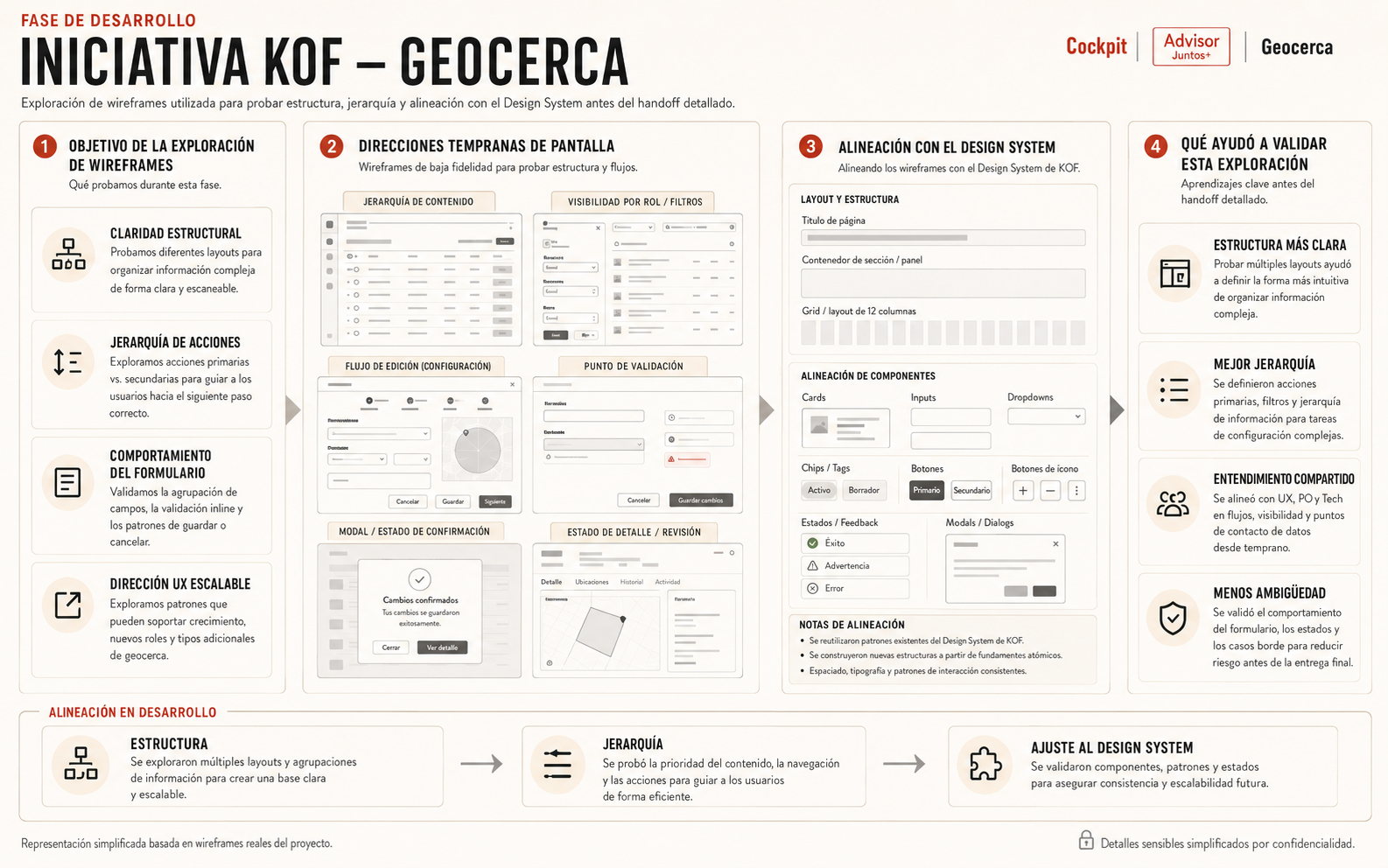
Exploración de wireframes usada para probar estructura, jerarquía y alineación con el Design System antes del handoff detallado.
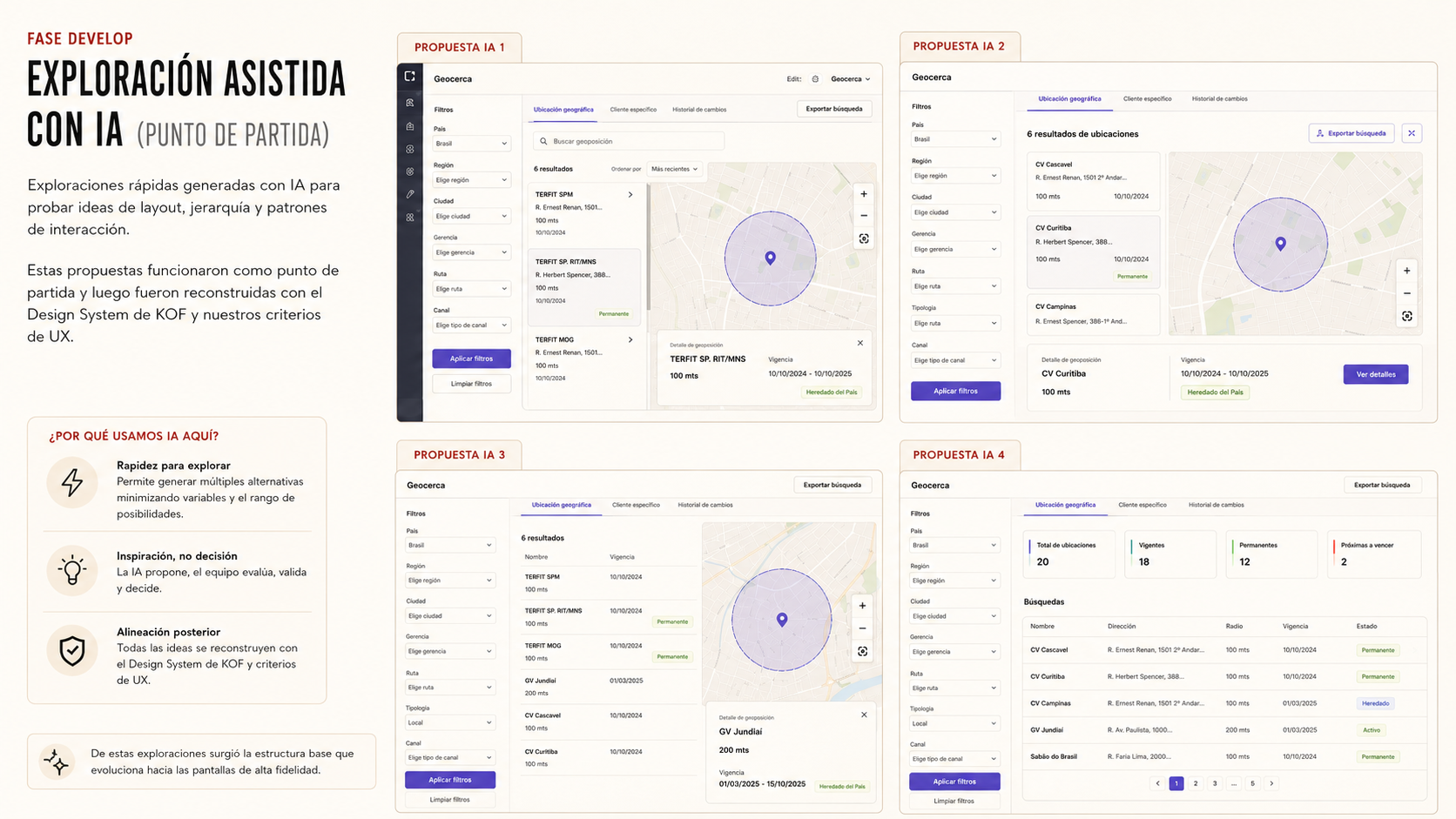
Exploración asistida por IA usada como punto de partida, luego reconstruida con el Design System de KOF y criterios de decisión de UX.
04 — Entregar
Validar y entregar soluciones de UX listas para desarrollo
Documenté flujos, prototipos, rationale y decisiones de interacción para que el equipo llegara a la implementación con menos dudas.
- Entregué user flows, wireframes, prototipos y documentación de UX.
- Validé las soluciones propuestas con usuarios funcionales y equipos técnicos.
- Preparé material de handoff para developers y equipos de producto.
Cómo usé la IA
Usé IA para ganar velocidad en la exploración y la documentación; el handoff final se sustentó en flujos validados con usuarios y equipos técnicos.
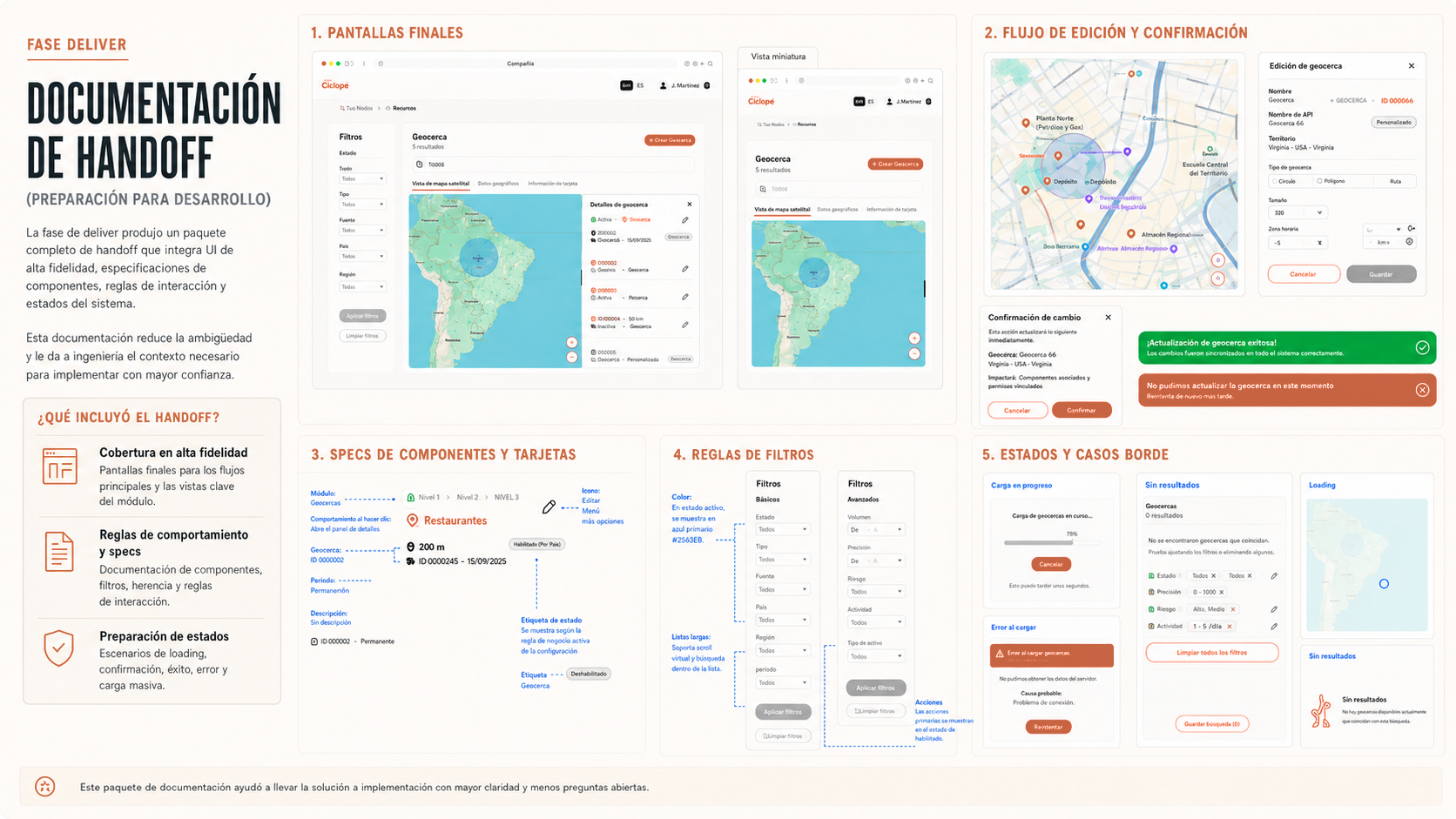
Documentación de handoff creada para reducir la ambigüedad y dar soporte a la disposición para desarrollo.
Antes / después
Antes
La lógica operativa era difícil de entender solo con documentación, y eso creaba ambigüedad entre UX, BA, equipos técnicos y usuarios funcionales.
Después
Flujos claros, prototipos y soluciones alineadas con el Design System que mejoraron el entendimiento compartido antes del desarrollo.
Solución final
El trabajo se enfocó en tres mejoras:
Flujos operativos más claros
Traduje lógica de negocio compleja en user flows y prototipos que mostraban cómo debía comportarse cada experiencia.
Soluciones alineadas con el Design System
Usé el Design System de KOF para mantener consistencia, extendiendo estructuras solo cuando la lógica del producto lo requería.
Ideación asistida por IA con control de UX
Aceleré la visualización temprana con Gemini y Figma Make, y reconstruí las soluciones finales con criterio UX y los componentes del sistema.
Impacto y resultados
Valor para el usuario
Experiencias internas más claras, diseñadas alrededor de los flujos de trabajo reales.
Valor para el negocio
Lógica de negocio compleja traducida en soluciones de UX accionables.
Valor para el equipo / proceso
Menos ambigüedad entre UX, BA, equipos técnicos y stakeholders antes del desarrollo.
Valor para el producto / sistema
Herramientas internas consistentes gracias al Design System de KOF.
Obstáculos y trade-offs
En UX empresarial el reto era hacer el flujo de trabajo comprensible sin perder precisión operativa, equilibrando complejidad de negocio, viabilidad técnica y Design System.
- Entender lógica de negocio compleja rápidamente.
- Trabajar con alcance y prioridades en movimiento.
- Equilibrar la consistencia del Design System con necesidades específicas de cada funcionalidad.
- Diseñar para flujos de trabajo internos donde los usuarios, las reglas y los permisos pueden variar.
Qué aprendí
Este proyecto confirmó algo que ya sospechaba del UX empresarial: la verdadera habilidad está en entender la lógica de negocio a fondo para hacerla usable y construible.
- Aprendí a moverme más rápido en contextos empresariales complejos sin saltarme el rigor de UX.
- Mejoré la forma en que valido soluciones con usuarios funcionales y equipos técnicos.
- La IA funciona como compañera de exploración cuando el criterio de UX se queda en el centro.
- Los Design Systems son más valiosos cuando apoyan la consistencia sin bloquear la lógica del producto.
Lo que los líderes dijeron sobre mi trabajo
Stephanie demostró un alto nivel de compromiso, profesionalismo y responsabilidad, contribuyendo en investigación, arquitectura de información, definición de experiencia, user flows, benchmarking, prototipado y validación.
Diana Castillo Vargas
Mantuvo una comunicación efectiva con los stakeholders y colaboró activamente con equipos multidisciplinarios, aportando una perspectiva centrada en el usuario para mejorar la experiencia del producto.
Diana Castillo Vargas
KOF es probablemente el ejemplo más claro de cómo trabajo en un entorno empresarial que todavía estoy aprendiendo a dominar: meterme debajo de la interfaz para entender la lógica de negocio, usar la IA donde realmente ayuda a acelerar la exploración, y convertir lo que empieza como ambigüedad en decisiones que el equipo puede validar y construir.
Stephanie Cacheo — Senior Product Designer / UX Lead